


Techgenyz: Tech News & Updates
3.23.00 Reviews
App Specs
- Version
- 3.0.4
- Updated On
- License
- Free
- Downloads
- 10,000+
- Developer
- Abhinava Innovations
- Categories
- News & Magazines
- Platform
- Android
Screenshots

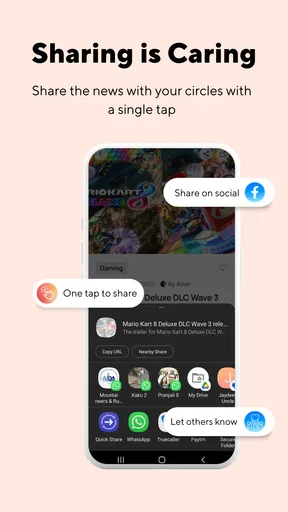
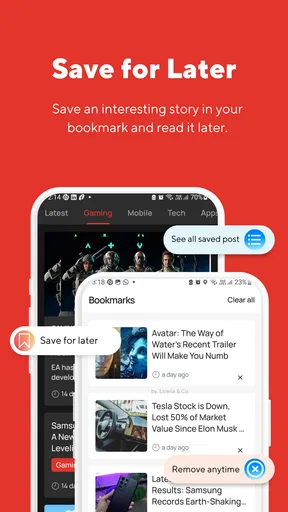
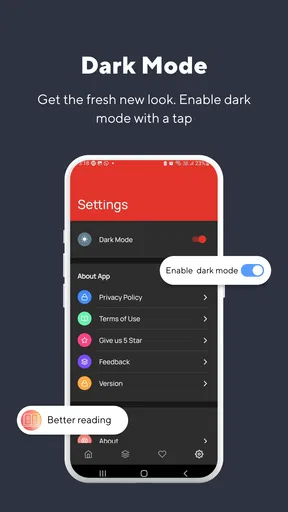
 Analysis by AppCompare
I approached Techgenyz: Tech News & Updates as a quick way to keep up with technology without opening several separate websites. It is a free news and magazine app from Abhinava Innovations, aimed at readers who want technology headlines, gadget coverage, gaming stories, app news, and related updates in one place. My overall impression is practical rather than spectacular: it can be useful when I want a lightweight starting point for tech reading, but it is not the kind of app I would rely on as my only source for important developments.
The app’s strongest idea is its breadth. Instead of focusing only on phones, only on gaming, or only on software, it brings several technology interests together. That makes it suitable for a casual reader who likes to move between subjects. At the same time, that broad approach creates the main question I had while using it: will the mix feel organized enough for someone who already follows specific topics closely? The answer depends on how you read news and how much control you expect from a dedicated news reader.
Getting started and finding the useful parts
Techgenyz is listed as an Android app for Everyone, and it runs on devices using Android 7.0 or later. That gives it a reasonably wide reach, especially for people who keep an older phone for reading. The current version is 3.0.4, so I would begin by checking that the installation has completed properly and that the app has been updated through the normal store process before judging its behavior.
The first place users may get stuck is not necessarily inside the news content. It is often the basic setup around an older device, an unstable connection, or a store installation that has not finished cleanly. If the app opens and closes immediately, shows a blank screen, or appears to stop loading, I would first close it fully, reopen it, and check whether other apps can access the internet. That simple comparison helps separate an app problem from a wider phone or network issue.
I also recommend giving the initial screen a moment to populate rather than repeatedly tapping buttons. News apps can appear unresponsive while content is being requested, particularly on a busy connection or an older handset. If the screen remains unchanged, switching between the available sections and returning to the main view is a sensible first check. I would avoid assuming that every delay means the content itself is unavailable.
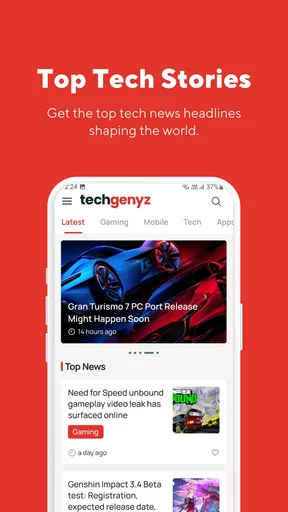
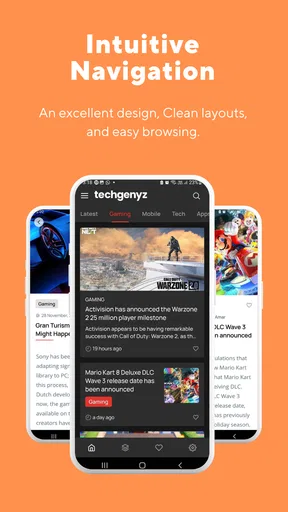
The app’s store summary points to top technology news, daily headlines, gadgets, gaming, apps, and more. In practical terms, I treated those subjects as different reading lanes rather than expecting one perfectly tailored stream. That distinction matters. Someone who wants a broad morning scan may enjoy the variety, while someone looking only for detailed hardware reporting may find the wider mix distracting.
How I would use it during an ordinary day
My most realistic use case is a short reading session during a commute or a coffee break. I would open the app, scan the main headlines, choose one or two topics that match my interests, and stop there rather than trying to consume everything. This approach makes the app feel more manageable. It works as a discovery tool: I can notice a subject worth investigating and then decide whether I need a deeper source afterward.
Worth Reading Before You Choose

EA SPORTS FC Mobile 26 Is a Bigger Football Game, but It Takes Time

Flipboard Shows What News Apps Must Do Beyond the Feed

Switching to Android Auto Means Rethinking Your Driving Routine

Google Calendar Makes a Crowded Week Easier to Manage

Ludo King Makes the Most of the Minutes Between Plans

Baby Panda World Brings Quick Play to Modern Phones, but Its Game Library Feels Busy
For example, if I am interested in a new phone announcement but also want a quick look at gaming and app developments, a mixed technology feed saves me from opening multiple tabs. The trade-off is that the app’s convenience comes from grouping subjects together, not from delivering the same depth as a specialist publication. I would use it to stay aware, then move elsewhere when I need technical testing, long-term product analysis, or a complete explanation of a complicated story.
One useful habit is to read the headline and the surrounding context before sharing anything. Technology news changes quickly, and a short headline can leave out important conditions. I found the app more valuable when I treated it as a first pass rather than a final authority. Use it to discover what deserves your attention, not to replace careful reading when the decision matters.
Where the reading experience can feel less smooth
The broad subject range is also the main source of friction. A reader may open the app hoping for gadget updates and encounter gaming or general app coverage first. That is not a defect in itself, because those subjects are part of the app’s purpose, but it means the experience may require more active browsing than a narrowly focused news application.
I would also keep expectations realistic about personalization. The app is best approached as a prepared technology news destination rather than as a fully customized research dashboard. If your ideal reader lets you build detailed topic rules, combine many publishers, save extensive reading queues, or control every part of the feed, a more specialized news platform may suit you better.
The average rating shown for the app is 3.2 from around 181 ratings, with three written reviews visible. I see that as a reason to test it personally instead of making a decision from the score alone. A rating in that range suggests that the experience may be useful for some readers while leaving others dissatisfied, which matches the app’s straightforward but broad positioning.
Setup checks that prevent avoidable problems
Before deciding that Techgenyz is unreliable, I would run through a short setup routine. First, I would confirm that the phone meets the Android requirement and has enough free space for a normal app installation. I would then restart the device if the installation behaved strangely. These are ordinary steps, but they are especially worthwhile when an app is being installed on an older phone or after several store updates have been queued.
Next, I would compare the app’s behavior on Wi-Fi and mobile data if both are available. If headlines appear on one connection but not the other, the likely cause may be the network, a data restriction, or a temporary connection problem rather than the news app itself. I would also check whether the browser can load other pages. That gives me a quick reference point without making assumptions about the app’s internal behavior.
If the application opens but content does not refresh, I would stop and reopen it once, then check the phone’s date and time settings. Incorrect system time can interfere with secure connections and online services in general. I would not jump straight to clearing storage, because that can remove local app state and create another setup step. More disruptive troubleshooting should come only after the simple checks have failed.
When an app displays older material, I would first consider whether the connection has completed its work. A slow response can look like a stale feed. I would also check whether the rest of the phone is struggling. If several apps are freezing, the issue is probably broader than Techgenyz. Closing unnecessary apps and restarting the phone may be more effective than repeatedly refreshing the news screen.
Because the app is free, I would not expect a payment step to be part of the basic decision to try it. The price is free, which makes it easy to evaluate without committing money. That does not remove the need to consider whether the reading experience fits your habits, but it does make a short trial a sensible option for curious Android users.
What to check when installation succeeds but use does not
There are several different failure patterns, and each points toward a different response. If the app never launches, I would focus on compatibility, installation integrity, and the phone itself. If it launches but the news area is empty, I would focus first on connectivity and temporary service conditions. If only one part of the experience behaves oddly while the rest of the app works, I would avoid treating the entire application as unusable.
I would also make sure the operating system is not aggressively limiting background activity or data access for the app, where those controls are available on the device. I am not suggesting that every phone applies the same settings; manufacturers organize these controls differently. The practical point is to inspect the phone’s own app and network settings when content consistently fails to update.
Another useful check is to install or open the app only through the normal official store route. That reduces the chance of using an altered or incomplete package. Since Techgenyz is designed for Android and has a minimum operating system of 7.0, I would be particularly careful with very old devices that no longer receive regular system maintenance. Compatibility on paper does not guarantee that every old handset will provide a comfortable reading experience.
Recovering a reading workflow after interruptions
News reading is often interrupted: a call arrives, the phone switches networks, or the app is closed before an article is finished. My recovery method is simple. I return to the main screen, scan the available headlines again, and reopen the subject that originally caught my attention. I do not assume that a missing screen means the story has disappeared; it may simply require the app to reload or the connection to settle.
If the app becomes stuck after returning from another application, I would close it normally and start a fresh session. That is less confusing than repeatedly pressing the same control. If the problem happens every time, I would note whether it occurs only on one network, only after long sessions, or only with a particular type of content. A repeatable pattern is much more useful than a general impression that the app is “broken.”
For a more efficient routine, I would divide reading into two passes. The first pass is headline discovery across gadgets, gaming, apps, and general technology. The second is selective reading of the stories that appear relevant. This prevents the broad catalog from becoming an endless scroll and helps me remember why I opened the app in the first place.
A less obvious trade-off is that a general technology app can reduce switching while increasing filtering work. I spend less time moving between separate sources, but I spend more time deciding which items deserve attention. That is a good exchange for a casual reader who likes variety. It is a poor exchange for someone who already knows exactly which beat, company, or product line they want to monitor.
If I need to investigate a claim, I would use the app as the beginning of a workflow. I would note the key topic, search for independent reporting in a browser, and look for primary information before making a purchase or repeating the claim. This is particularly important with gadget rumors, software changes, and gaming announcements, where early headlines can be incomplete or quickly revised.
When the app is not the cause of the problem
It is easy to blame a news app when the real issue is the phone. A nearly full device, an unstable connection, an outdated system component, or aggressive battery management can affect many applications at once. If Techgenyz is slow while other online apps are also struggling, I would troubleshoot the phone and network before reinstalling anything.
Likewise, if content loads normally on one connection but not another, I would investigate the network settings, signal quality, or any data-saving controls. If the app works after a restart but slows down again as the phone becomes busy, that points toward device resources rather than the subject matter or the developer’s content organization.
Reinstallation can be useful as a last resort, but I would use it carefully. I would first make sure I know whether any local reading state matters to me, then remove and install the app again through the standard store. If the same behavior returns immediately, repeating the process is unlikely to help. At that stage, I would choose a browser or another news source for urgent reading and report the issue through the appropriate app-store support route.
This distinction also affects expectations. Techgenyz is a news and magazines app, not a complete diagnostic tool for every technology problem. If I am looking for device support, official product documentation, or a specialist publication with deep testing, I would go directly to those alternatives. The app’s value is its accessible mix of technology topics, not its ability to replace every other information source.
Who should use it and who should choose something else
I would recommend Techgenyz to Android readers who enjoy a broad technology overview and want a free place to browse headlines across several connected subjects. It is a reasonable fit for a student checking what is happening in technology, a casual gadget fan, or someone who wants a quick break from general news without following a long list of individual sites.
I would be more cautious about recommending it to a professional researcher, a buyer making an expensive hardware decision, or a reader who needs strict source control. Those users usually benefit from specialist publications, official announcements, product documentation, and multiple independent reports. A broad app can help them discover leads, but it should not be the only step in their process.
Compared with reading technology websites directly in a browser, the app offers a more focused starting point and avoids some of the distraction of unrelated web pages. The browser remains better when I need to compare several sources, search an older article, or move quickly between official and independent information. Compared with a highly customizable news aggregator, Techgenyz is more approachable but may offer less control over exactly what appears in the reading flow.
Its audience reach is modest but established, with over ten thousand installs. That does not prove that it will suit me, yet it does indicate that the app has found a real group of Android readers. The developer is Abhinava Innovations, and the app has been available since July 2017, giving it a longer presence than a brand-new experiment. I still judge it by current usefulness rather than age, but that history makes it worth considering for a simple technology-news routine.
My practical verdict
After weighing the convenience against the friction, I see Techgenyz as a useful secondary news companion. I like the idea of opening one app for gadget, gaming, app, and wider technology headlines, especially when I only have a few minutes. I also appreciate that it is free and suitable for a general audience. The main limitation is that its wide scope asks me to filter actively, and readers seeking deep customization or specialist authority may quickly outgrow it.
My advice is to try it with a clear purpose: use it for a daily scan, identify stories worth following, and verify important information elsewhere. If it opens normally, loads content consistently, and its mixed subject range matches your interests, it can earn a place in your reading routine. If you want a carefully controlled feed, extensive research tools, or detailed specialist analysis, a dedicated alternative will be the better choice.
My final recommendation is cautiously positive: Techgenyz is worth trying for broad, low-commitment technology updates, but I would keep another source nearby for depth, verification, and troubleshooting. That balance gives the app a realistic role: a convenient doorway into technology news rather than the entire house.
Pros
- Covers emerging technologies alongside major industry announcements.
- Articles are generally quick to scan during short breaks.
- Useful for discovering lesser-known apps
- gadgets
- and digital services.
- Topic variety appeals to readers beyond smartphone news.
- Regular updates help keep the feed feeling current.
Cons
- Some stories may feel more like news summaries than deep analysis.
- Coverage quality can vary between technology categories.
- Frequent updates may make important articles easy to overlook.
- Readers seeking highly technical tutorials may find limited detail.
- Some content may be less relevant to users outside the tech industry.
FAQs for Techgenyz: Tech News & Updates
What is Techgenyz: Tech News & Updates?
Techgenyz is a technology news and information app designed for readers who want quick access to updates about gadgets, mobile devices, apps, artificial intelligence, cybersecurity, software, and other digital trends. After exploring the app, I found that it focuses on delivering short, easy-to-read articles rather than functioning as a technical tool. It can be useful for staying informed without visiting several technology websites every day.
What type of content can I read in the Techgenyz app?
The app covers a broad selection of technology topics, including smartphone launches, app recommendations, emerging gadgets, internet services, artificial intelligence, gaming, business technology, and general digital developments. The available stories may change frequently as new articles are published. Readers should remember that the app is primarily intended for news and informational content, so some articles may be opinion-based, promotional, or written for a general audience rather than technology professionals.
Is Techgenyz: Tech News & Updates free to download and use?
Techgenyz can generally be downloaded without an upfront purchase, allowing users to browse its technology articles at no initial cost. However, the exact experience may depend on the version available for your Android or iOS device, including whether advertising, optional features, or external links are included. Before downloading, it is sensible to check the current store listing for pricing details, supported devices, privacy information, and any in-app purchase conditions.
Does Techgenyz require an internet connection?
Yes, an internet connection is normally required to load the latest news stories, images, categories, and updates in Techgenyz. The app is designed around online content, so performance can depend on your Wi-Fi or mobile data connection. If your signal is weak, articles may take longer to open or images may not appear correctly. Users with limited data plans should also be aware that frequent browsing and media loading can consume mobile data.
Is Techgenyz suitable for keeping up with breaking technology news?
Techgenyz is useful for discovering technology stories and following current digital trends, but it should not necessarily be treated as a real-time breaking-news service. Publication speed can vary, and important events may appear later than they do on specialist news outlets or official company channels. I recommend using it as a convenient daily reading source while confirming major announcements, security warnings, product specifications, and release information through official or highly established sources.


